The Declining Availability of Data

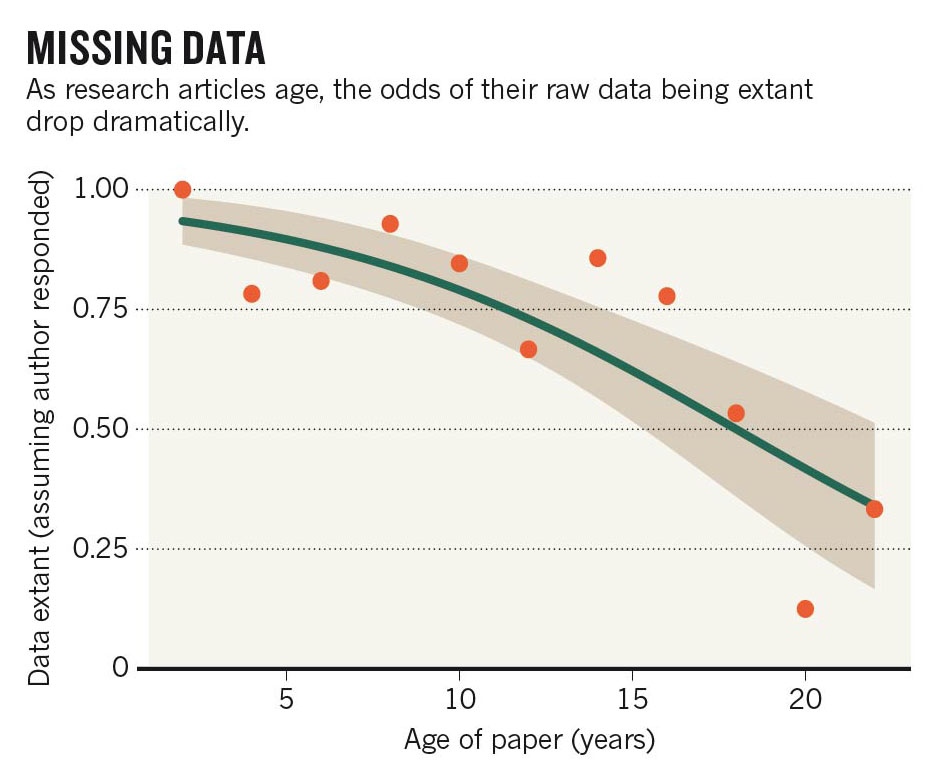
The journal Current Biology published a paper yesterday that proves what may be obvious to many of us: we’re really bad at keeping track of old data. Not only is it difficult to maintain data, particularly digital data, for many years but researchers are not trained in how to preserve our information. The result is a decay of data availability over time.

Data Availability Plot
Vines et al., The Availability of Research Data Declines Rapidly with Article Age, Current Biology (2014), http://dx.doi.org/10.1016/j.cub.2013.11.014

This decay not only hurts us, the original data producers, by limiting opportunities for our own data but it also hurts others in our field. The Nature commentary on the original article provides a great example of why this is, citing an ecologist who works with a plant studied 40 years ago by another scientist. Because the older data are now lost, the first ecologist cannot make any useful conclusions about the plant over the long term.

In the Nature commentary example, the original scientist is now dead but his data are still valuable, meaning that data are often assets to be cared for long after we are alive and need them. To address this, one scientist has suggested we develop scientific wills, of sorts, to identify datasets of value in the long term and who will care for them. No matter what, we need to start thinking about our data in the long term.

I’m not saying that every scientist needs to be an expert in digital preservation, but it does help to know the basics of keeping up with your data. Still, the best way to preserve data in the long term is by giving it to a preservation expert (aka. a data repository) to manage. This way, you don’t have to learn the ins and outs of preservation and you don’t have to worry about keeping track of the data yourself. It’s just what every scientist wants: a hands-off system that keeps track of your data while costing little to no money.

Data repositories come in two major flavors: disciplinary repositories run by an outside group and your local institutional repository run by your library. Either way, it’s their whole job to make sure that whatever is in their repository is available many years from now. I suggest starting with your local repository when looking for a home for your data, but be aware that many of these repositories were built for open access articles and cannot handle large datasets. In that case, consider one of the follow repositories:

These repositories make data openly available because many journals and fields are coming to expect data publication alongside article publication. Still, it’s possible to upload your data and embargo it for a short period of time, allowing you to keep working with the data but not worry about preserving it. The repository figshare even has a new private repository feature, which I think is pretty cool: it keeps your data private (and privately shareable) for any amount of time but lets you easily switch a dataset to public when you need to.

This list represents my repository highlights but there are obviously many more available, especially in biology. Ask around to find out if there is one your peers prefer, which will make your data more likely to be found and cited.

Finally, I will add that we will be seeing much more about data repositories going forward. Between journal and funder requirements to publish data and the recent White House OSTP memo pushing for even more data sharing, data repositories and data publications are only going to grow from here. If it means that we stop hemorrhaging data over time, I think that’s a very good thing.

Posted in dataManagement, digitalPreservation | 1 Comment

Save Your Thesis (and back it up too)

I remember being incredibly paranoid when I was writing my PhD thesis that my computer would crash and I would lose all of my files. After 5 long years of work, I did not want anything keeping me from finally graduating, lost dissertation and data included. Luckily, no such calamity befell me, but I did have a friend whose laptop was stolen in the middle of writing his thesis. He was forced to start over from scratch because he did not have a good backup copy. Sadly, this is not a unique occurrence.

It’s bad enough to deal with the stress of writing a thesis and worrying about moving on from school—you do not need the added paranoia about losing (or difficulty finding) important information on top of that. Thankfully, data management offers some practical tips that can keep your worries focused solely on writing the actual thesis.


Back up your files

One strategy that will save you a lot of thesis stress is having a good backup system. I recently wrote about “the Rule of 3”, and thesis time is a great opportunity to follow it. The rule basically says that you should have 3 copies of your files, two onsite and one offsite. If one of your onsite copies fails, you still have two copies to fall back on; this can reduce a lot of paranoia about losing your important files.

To further allay your fears, I recommend using automated backup systems and test restoring from them. Automation removes any work that you have to do beyond set up because, frankly, you have enough things to work on right now. Once you set up your backups, you should run through the procedure for getting your files back from the system. This ensures that you won’t be frantically searching for the restore procedure if you lose your main copy and that your backup system is actually working.

Finally, I will remind you about the hidden perils of cloud storage. In a way, cloud storage is great for thesis writing, especially if you want access from several locations. But you should definitely read your cloud storage service’s terms of service to be sure that they can’t do anything they want with your thesis files. You thesis is too important to store in cloud storage that doesn’t protect your content.


Organize your information

A small thing that will smooth out the writing process is organizing your thesis documents as you create them. First consider how you want arrange your thesis files. It may be logical to organize things by chapter or section, keeping separate folders for figures, data, references, etc. Pick a system that feels logical to you so you’ll know where to find everything when cross-referencing and assembling the final document.

In conjunction with having a good organization structure for your files, think about consistent file naming. Labeling written draft files differently than figures and tables, and drafts differently than final versions makes it easier to find and use information. You can also tell, at a glance, what is done and what you have yet to do.

Another practice I highly recommend is to version your drafts. This means regularly saving a draft to a new file with a new version number. For example, I might save my first chapter drafts as the files “Ch01_v01.docx”, “Ch01_v02.docx”, etc. with each consecutive version being a more complete draft. The final version of this chapter would be named “Ch01_FINAL.docx”.

Not only does versioning allow you to easily revert to an earlier version of your draft or recover from a corrupt file but it also helps you keep track of the most current copy. This last point is very important if you are writing your thesis on multiple computers; you need to know which is the most current copy so that you don’t repeat effort or have to deal with merging edits.

In the end, you want a clear workflow for where things will go and how they will be named. Taking a few minutes before you start your thesis to come up with a system and sticking with these workflows can save you time later when you are looking for that one particular file right before submission.


Manage your references

I cannot say enough about the value of a good citation manager while writing your thesis. You are going to be citing a lot of sources, so you want a system that both organizes your references and helps you format your actual citations. There are many options available to you—most notably Medeley, Zotero, Refworks, Endnote, and Papers—so pick one and run with it. Writing a thesis without a citation manager is just asking for more frustration and stress.


Think ahead

You should address all of the things mentioned in this post before you actually start writing. It will take a little time at the beginning, but once you have set up your backup systems, established your workflows, and chosen a citation manager, everything should fade into the background behind actually writing. That’s the whole point of data management—to build workflows that make it easier for you, in the long term, to do your work.

So take a few minutes at the beginning of the process to set things up. I can’t promise it will entirely relieve your stress, but at least you’ll be worried about your writing instead of losing your thesis.

Posted in dataManagement | 1 Comment

E-Lab Notebooks

I gave a talk on e-lab notebooks (ELNs) at UW-Madison yesterday. I cover the reasons for making (or not making) the switch to an ELN, what to look for in an ELN, and some things that Madison has done in this area. If you are unfamiliar with e-lab notebooks, this talk should provide you with a nice background in the technology.

In addition to the slides below, you can also watch a video of the talk here.

Posted in documentation, labNotebooks | Leave a comment

Rule of 3

Storage
http://www.flickr.com/photos/9246159@N06/599820538/ (CC BY-ND)

There is a saying about storage in the library world: lots of copies keep stuff safe. The abbreviation, LOCKSS, not only defines this principle but also provides the name of two storage systems, LOCKSS and CLOCKSS, which libraries buy into to add redundancy to their data storage. The idea behind the principle is that even if your local storage system fails, you still have access to your data.

LOCKSS is a great concept, but for everyday storage I boil it down to the ‘Rule of 3’. This rule of thumb says that you should keep 3 copies of your data, 2 onsite copies and 1 offsite copy. This is not only a good level of redundancy, but also a very achievable level of redundancy.

The third offsite copy is actually critical to the success of the Rule of 3. Many people keep their data and a backup copy on-site, but this doesn’t factor in scenarios where the building floods or burns down or a natural disaster occurs. One only has to look at universities recovering after hurricane Katrina or the Japan tsunami to see how devastating a natural disaster can be to research (among other things). Storing a copy of your data off-site can make the recovery process a bit easier if everything local is lost.

While the Rule of 3 speaks mainly to redundancy, I also see it as a recommendation for variety; mainly, that each copy should be on a different type of hardware. Usually, the first copy is on your computer, so options for the other copies include external hard drives, cloud storage, local server, CDs/DVDs, tape backup, etc. Each of these technologies has its own strengths and weaknesses, so you spread out your risk by not relying on one storage type.

For example, if you keep your data backed up off-site on commercial cloud storage, keeping an extra copy on a hard drive on-site means that the safety of your data is not based solely on the success of a business. Alternatively, tape backup is high quality but slow to recover from, but it’s a great option for the ‘if all else fails’ backup copy. The exact configuration of your backups will depend on the technology options available to you, but variety should be a factor when you choose your systems.

I personally love the Rule of 3 and follow it for my work information. For my data, I keep:

  1. a copy on my computer (onsite)
  2. a copy backed up weekly to the office shared drive (onsite)
  3. a copy backed up automatically to the cloud via SpiderOak (offsite)

The shared drive is the weak link in this chain, as I transfer files manually, but setting a weekly reminder in my calendar makes sure that I stay on top of things. Additionally, I would not use the office shared drive if I had security or privacy concerns with my data. Besides keeping my data in these 3 locations, I have practiced retrieving information from both backups so I know that they are working and how to restore my information if disaster strikes.

In the end, the Rule of 3 is simply an interpretation of the old expression, ‘don’t put all of your eggs in one basket.’ This applies not only to the number of copies of your data but also the technology upon which they are stored. With a little bit of planning, it is very easy to ensure that your data are backed up in way that dramatically reduces the risk of total loss.

Posted in dataStorage | 7 Comments

Open Access/Open Data

This week is Open Access week, a celebration that promotes and raises awareness for the growing Open Access movement. There are a lot of great reasons to publish open access, including making research openly available and shifting away from an unsustainable journal pricing model, but I want to focus my celebration of Open Access week on Open Data.

Open Access and Open Data are very different but they share common values: accessibility, transparency, ease of information reuse, a return on investment for public funding, and advancing research. While Open Access publishing has taken off in the last few years, especially with the success of open journals like PLOS ONE and faculty-led mandates like the one from Harvard, the efforts to open up our research data are still developing. For this reason, I think it’s important to take a moment during Open Access week to talk about Open Data

What is Open Data?

Open Data is the idea that research data should be made available upon the publication of a paper and as part of peer review. Data sheds light onto the research process in a way that can’t be done with an article alone. With stories of fraud and irreproducible research increasingly in the news, we need methods like Open Data for detecting these issues earlier.

Another reason for Open Data is that the value of data is increasing in the current funding climate. Between more access to data and new tools for analysis and mining, we are able to conduct research that simply wasn’t possible before. With shrinking research budgets, data are valuable research products that we can no longer afford to ignore.

Why should I make my data open?

A good reason for Open Data comes from a recent study in PeerJ that found a 9% average increase in citation rates for papers that had open datasets as compared to papers without shared data. The citation increase was upwards of 30% for the older papers sampled, suggesting that this citation effect increases over time.

Opening up research data also benefits us by being able to work with data that we did not have access to before. Not having to produce all of the data ourselves is great thing, but that data has to come from somewhere. We must be willing to provide useful data to others if we want access to useful data for ourselves.

What can I do about Open Data?

The first step is simply to understand why there is movement toward Open Data, even if you personally choose not to share data. The way we conduct research is changing and we need to know how to navigate those changes in order to be successful. Open Data is not going to universally happen overnight, but the ever increasing momentum in this direction means we need to stay informed of the why’s and where’s.

For those a little more comfortable with the idea of Open Data, consider sharing an old dataset or a negative/unpublishable study. This is a great way to get credit for information that you are not actively using and it will familiarize you with the data sharing systems. From there, you can share more datasets as you choose or as requested by funders/journals/readers.

As a librarian, I’m also spending this week letting people know about Open Data. This blog post is one of the ways I’m doing that but I have also hung up a poster in my library:

In keeping with the open data theme, the files are openly available (both PDF and Adobe Illustrator files) for you to use and remix. One person has already used the files to make a poster for their library and I would love to see more versions!

Happy Open Access week!

Posted in openAccess, openData | Leave a comment

Defining Data

I’m surprised that I haven’t discussed this on the blog yet, but there is a pretty fundamental question that needs to be addressed in order to discuss data management: what does “data” even mean?

Coming from a scientific background, it’s easy to imagine large tables of numbers as data or files filled with the repetitive A, T, G, and C’s of genetic code, but data regularly defies these stereotypes (particularly in non-science disciplines). Data can be videos, large collections of text, images, tweets, geospatial information, etc. What can be used as data is only limited by the research question and the creativity of the researcher.

Though research data can be a lot of things, it is still useful to define the term so we know what information needs management. So here is my working definition of data: anything that you can perform analysis upon. It’s a wide definition, but there are so many types of research out there that anything narrower won’t apply. Despite the broad definition it is still possible to break the diversity of data into four general types.

What Data Are

Data is often categorized into the four following groups: observational data, experimental data, simulation data, and derived/compiled data. Not only are the data in each group different, but the way that you should manage each type differs. Let’s go through each group now.

Observational data are tied to a time and place and are a record of something that occurred there. This type of data includes everything from bird counts, to polling data, to weather sensor data, to recordings of dance performances. The proper management of this data is critical because this information is not reproducible.

Experimental data are created under a particular set of conditions that are (hopefully) reproducible. This type of data covers everything from gene sequences, to chromatography data, to measurements from the Large Hadron Collider, to psychology studies. Good data management is important here too because, depending on the experiment, it can be very expensive to reproduce data. Experimental data also requires good documentation so that, should the need arise, the data can be accurately reproduced.

Simulation data are created using models and code. This type of data covers everything from climate models, to economic models, to simulations of experiments/experimental data.  In this group, it is more important to preserve the code that created the data than the data themselves, as the data can be recreated from the code.

Finally, derived/compiled data are compilations of other datasets that can be used for new types of analysis. This type of data covers databases, large corpora used for text mining, collections of images, etc. Standard data management applies, but you’re also more likely to run up against data size concerns and licensing/copyright issues with this data type than the others.

What Data Aren’t

I defined what data are but I think it’s also important to talk about what data aren’t. The OMB Circular A-110 contains a nice round-up of what the government does not consider to be research data.

Research data is defined as the recorded factual material commonly accepted in the scientific community as necessary to validate research findings, but not any of the following: preliminary analyses, drafts of scientific papers, plans for future research, peer reviews, or communications with colleagues. This “recorded” material excludes physical objects (e.g., laboratory samples). Research data also do not include:

(A) Trade secrets, commercial information, materials necessary to be held confidential by a researcher until they are published, or similar information which is protected under law; and

(B) Personnel and medical information and similar information the disclosure of which would constitute a clearly unwarranted invasion of personal privacy, such as information that could be used to identify a particular person in a research study.

That doesn’t mean that these things aren’t important to manage and preserve, just that funders don’t consider them to be data for the purposes of sharing and other policies. I will also point out that while lab notebooks are not technically data nor do they need to be shared, they contain important information that gives context to data and should therefore be preserved alongside any data that they describe. The ultimate point is that research is built on multiple information sources, each with its own information management need, but not all of these sources fall under the umbrella of “data”.

Final Thoughts

It’s important to recognize that the term “data” is more broadly applicable than you may think. Something you would not consider to be data can be the critical foundation for research in another field. But that doesn’t mean that the term “data” applies to all research materials.

The broad definition of data goes hand in hand with the realization that not all data should be managed in the same way. Understanding the diversity and nuances of data allows us to make good management decisions to better preserve data and make research more reproducible.

Posted in dataManagement | Leave a comment